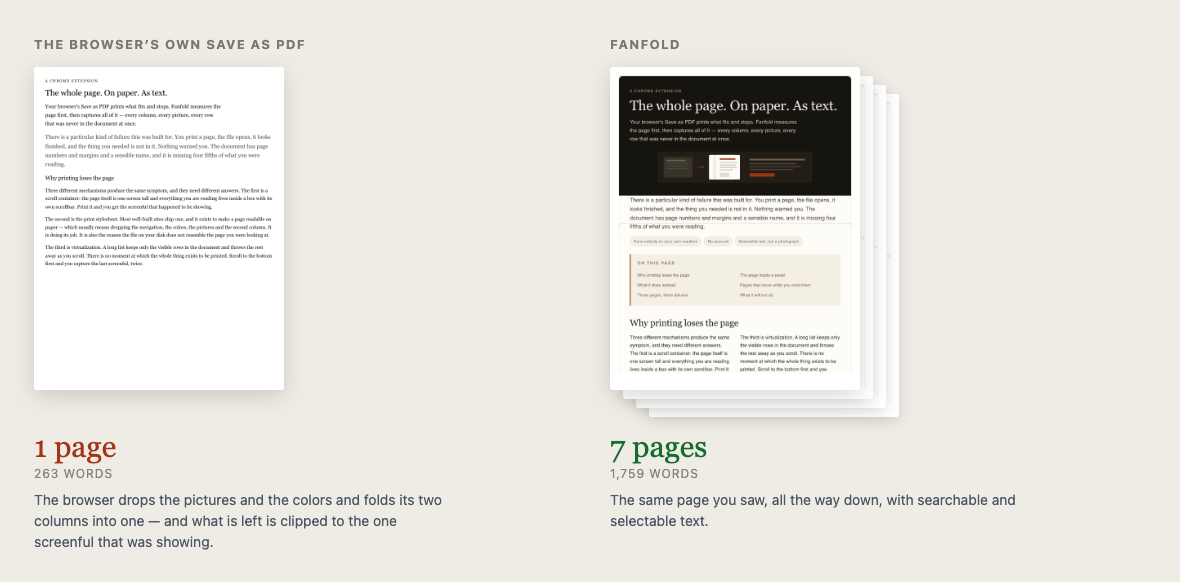
Complete, visually accurate, searchable PDFs. Awkward pages — live tables, panels, frames, pages that load as you scroll — painstakingly walked and reassembled. Pause and resume. A history of every capture. Nothing ever leaves your computer.
Chrome may show a caution notice when you install: Fanfold’s publisher account is new, and Chrome flags new publishers until they have a few months of history. What that means.
The details, for the curious
Ask the browser to print a 1,000-row table and you get a 29-page PDF holding 21 rows, with a bunch of blank pages. The file opens and looks finished — you find out it isn’t when you need the data.
21 of 1,000 rows
Booking widgets, embedded readers, dashboards inside a shell. Print one from the browser and you get a fraction of it. Fanfold retrieves the whole thing. If part of the page comes from another site, Fanfold spots it and asks your permission to retrieve it.
300 of 300 paragraphs — the browser gives 23
The part you actually want — a data grid, a docs article, a live demo — scrolls in its own box while the page around it barely moves. Other tools grab the biggest scrolling box and usually get the wrong one. Fanfold measures the boxes first and lets you pick: the page as it looks, the box in full, or both.
21 pages of menu, and none of the article
Content loads in above the point you have reached and everything shifts down. Fanfold tracks where the content actually went between steps rather than trusting the scroll position.
A long page takes a while, and you can be pulled away mid-capture. Chrome slows down tabs you’re not looking at, so a capture can quietly end up incomplete. Fanfold pauses instead, and carries on when you come back.
57,238 characters — the same page, with and without a tab switch
Scrolling past pixels is not the same as losing text. Fanfold judges a capture by what actually reached the PDF, so it warns you when text is genuinely missing and stays quiet when nothing is.
Titles, addresses, times, and whether each capture worked — never page text or images. The last 500 are kept, entries expire after 30 days by default, and you can delete any of them yourself. If you would rather keep them until you delete them, there is a switch for that.
Fanfold has no standing access to any website. It can read the tab you are on, from the moment you press the button, and not before.
If you want PNGs rather than a PDF, it will do that instead, splitting them where they get too tall to be one file.
No accounts, no sign-in, no telemetry. Fanfold makes no network requests at all — not on install, not on capture. There is nowhere for a page of yours to go.
The PDF carries a real text layer taken from the page itself, not from image recognition. So the words are the words, not a guess at what the pixels say.
It is not only English: a 300-row test page in Japanese, Russian, Greek and accented Latin comes back out of the PDF whole, every row.
Extraction has been checked with the standard poppler tools and with the PDF reader built into macOS. Those are the readers that were tested; we make no claim about any others.
A very long page takes a while. It is walking it, not printing it.
Sticky headers are hidden by a heuristic. A page that pins its header some other way may repeat it down the document.
Fanfold is Chrome-only.
Words painted onto the page, like a chart's labels or anything drawn on a canvas, are pictures rather than text. They are captured, and they are not searchable. Fanfold says so when a meaningful part of a page is like that.
A page can hide text in a way that leaves nothing to detect. That case is rare, and it is the one kind of missing text Fanfold cannot warn you about.
Works in Chrome. Takes about ten seconds to install.